Accepting credit card payments is pretty much non-negotiable these days. Customers expect it. But if you’re using QuickBooks Payments, it’s important to know exactly what those swipes, dips, and taps are costing you in 2025. Because while QuickBooks makes getting paid simple, the fees can sneak up on you if you’re not paying close attention.
Read Also: QuickBooks Chart of Accounts Explained Setup, Categories, and Tips
The Basic Fee Structure in 2025
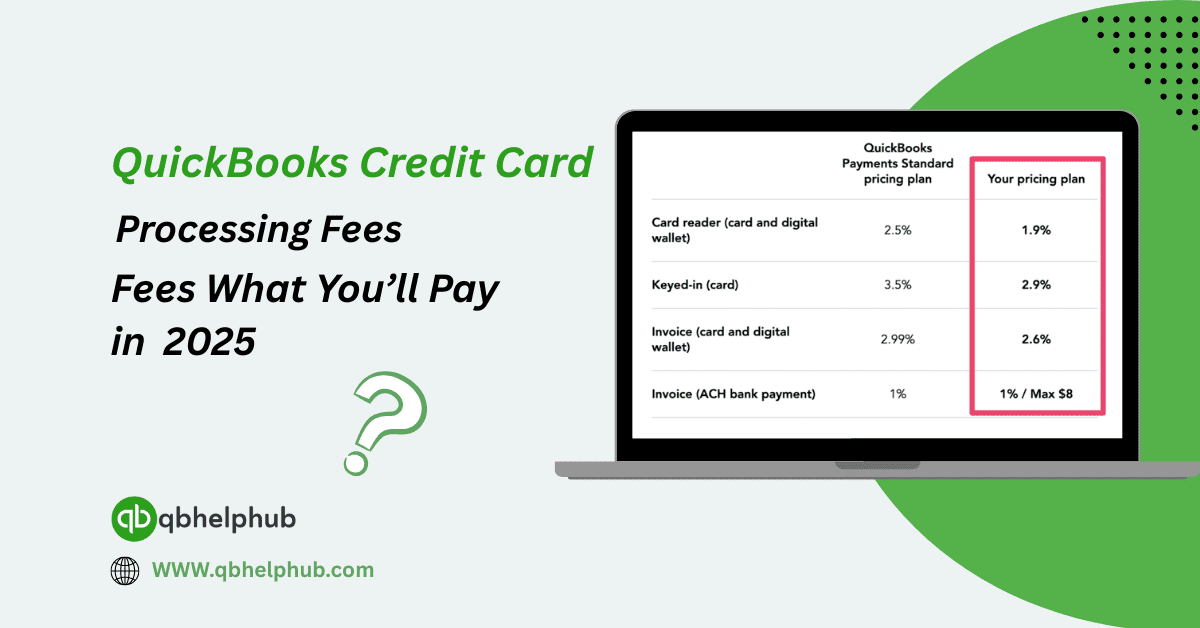
QuickBooks Payments charges fees based on how the transaction happens. It’s not one-size-fits-all, the way you accept the payment really affects how much you’ll pay. Here’s what you can expect in 2025:
- Swiped/Inserted (card present): 2.5% + $0.25 per transaction
- Online invoice or manually entered (card not present): 2.9% + $0.25 per transaction
- ACH bank transfer: 1% per transaction (capped at $10)
So, if a customer pays you $1,000 through an online invoice, expect to pay about $29.25 in fees. Not horrible, but multiply that by dozens or hundreds of payments per month, and it adds up quickly.
The Real Difference Between Card-Present and Card-Not-Present
The cheaper rate for card-present transactions isn’t just a coincidence. When a customer is right there, inserting or swiping their card in person, the risk of fraud is lower, so your fees are too.
But let’s be honest: not every business runs face-to-face anymore. For online sales, phone orders, or emailed invoices, you’ll almost always be stuck with the higher 2.9% + $0.25 rate.
If you’re still doing business mostly in person but manually typing in card numbers, you might be paying more than you need to. Switching to a card reader (yes, even a simple one) could save you money with every swipe.
ACH Transfers: Your Quiet Little Fee Saver
QuickBooks lets customers pay you by ACH transfer too, essentially, a direct bank-to-bank transaction. It’s only 1%, and that’s a breath of fresh air compared to credit card rates.
Even better? The fee maxes out at $10. So, if someone pays you $5,000 via ACH, you still just pay ten bucks.
If you deal with larger invoices, maybe you’re in design, consulting, construction, steering clients toward ACH can seriously reduce your fee load. It’s not instant like cards, but the cost difference might be worth the slight delay.
Monthly Fees or No Monthly Fees?
QuickBooks doesn’t charge a monthly fee just to use Payments. That’s good news.
However, keep an eye out for optional add-ons, like recurring billing tools, next-day deposits, or mobile hardware. Some come with added costs. While those aren’t technically “processing fees,” they still hit your bottom line. Always check your billing dashboard in QuickBooks, those small line items tend to sneak in quietly.
Read Also: QuickBooks Payments Guide Fees, Rates, and How It Works?
Chargebacks and Dispute Fees in 2025
No one likes chargebacks. They’re frustrating, time-consuming, and yep, they’re not free.
In 2025, if a customer disputes a charge and files a chargeback, QuickBooks Payments will hit you with a $25 fee per incident. If the customer wins, you lose the money and the fee. If you win, you still might be out the $25.
The takeaway? Always have strong documentation. Clear contracts, receipts, delivery confirmations, whatever you can keep to protect your business. In the age of quick refunds and even quicker disputes, it pays to be prepared.
International Cards and Foreign Transactions
If you’re accepting cards issued outside the U.S., prepare for a little extra.
QuickBooks tacks on a 1% cross-border fee on top of the usual processing rate. It doesn’t matter whether the transaction is online or in person, if the card’s international, you’re paying a bit more.
For businesses with international clients, this isn’t a dealbreaker, just something to account for when budgeting or invoicing. You don’t want to find out the hard way after getting paid.
Deposits and Processing Times: What’s New in 2025
Most credit card payments now land in your account within 1–2 business days. That hasn’t changed much, though QuickBooks does offer instant deposit (with a 1.75% fee per transaction).
That extra fee might sound steep, but if cash flow’s tight and you need the funds right now, it could be a lifesaver. Just don’t lean on it constantly, it’ll eat into your profits fast.
ACH deposits still take 2–5 business days, depending on your bank. So again, lower fees, but slower cash.
Watch for Hidden Fee Triggers
This one’s important. Even if you’re careful, a few small missteps can increase your costs:
- Manually entering cards instead of using a reader
- Letting too many transactions fail, which might raise your risk score
- Not updating your business type or processing volume
If QuickBooks decides your business is high-risk (even wrongly), they could impose reserve requirements, meaning they’ll hold a percentage of your funds for “security.” Avoid that mess by keeping your payment info updated and your chargeback ratio low.
Are the Fees Worth It?
Let’s be honest, no one loves paying credit card fees. But in return, QuickBooks Payments does offer convenience, speed, and integration.
You’re not jumping between apps to reconcile your books. You’re not manually logging payments. Your clients click, pay, and the money shows up, synced right into your QuickBooks.
Could you find cheaper processors? Maybe. But they won’t always play as nicely with your accounting setup. It’s a trade-off between pure cost and smoother operations.
Tips to Cut Costs Without Cutting Corners
If you’re serious about saving money on processing fees in 2025, here’s what you can do:
- Encourage ACH payments for large invoices
- Use card readers instead of keying in numbers
- Avoid instant deposits unless absolutely necessary
- Dispute chargebacks fast with strong backup documentation
- Review your fee statements monthly for surprises
Over time, these small moves can keep more money in your pocket without disrupting how you get paid.
Conclusion
QuickBooks credit card processing fees in 2025 remain competitive, but like any fee structure, they can creep up if you’re not careful. By understanding the different rates, avoiding common fee traps, and encouraging lower-cost payment methods, you’ll be in a stronger financial position.
At the end of the day, it’s not just about what you’re paying, it’s about knowing why you’re paying it. Stay informed, stay in control, and make your tools work for you, not the other way around.
Read Also: QuickBooks Self-Employed: Top Features, Benefits & Who It’s For?
Get In Touch with Us
If you are interested to know more about QuickBooks and basic troubleshooting steps, we are here to help you through our dedicated customer service team. Fill out the customer response form or feel free to reach to us at support@qbsolved.com Our highly competent team is here to solve all your queries regarding QuickBooks.