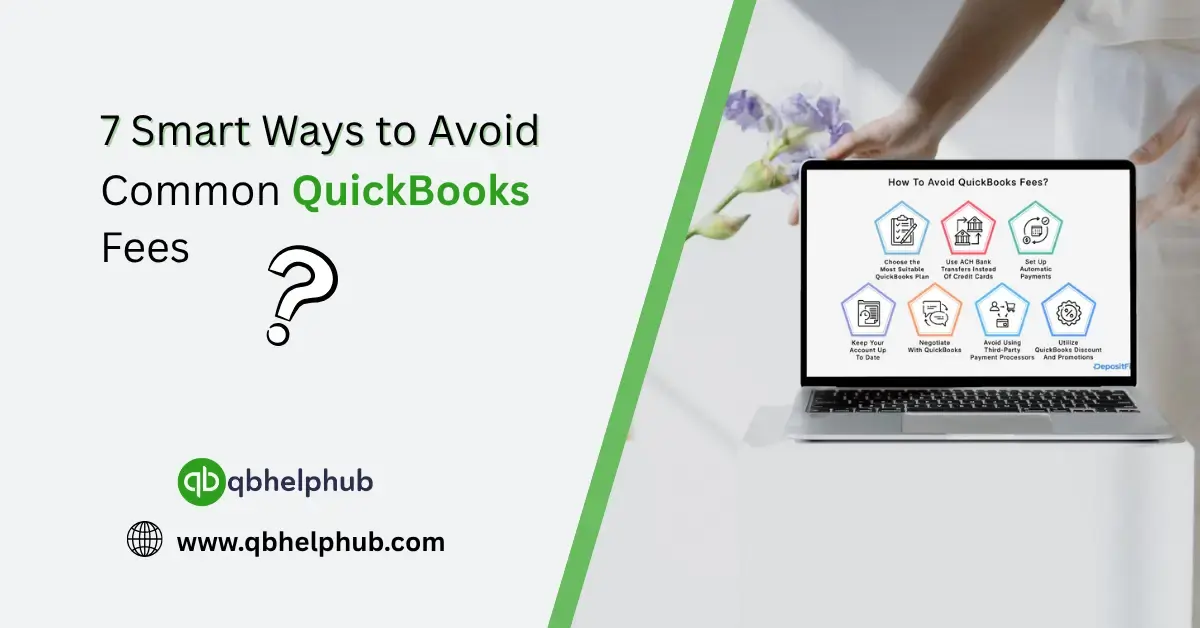
Let’s be real, QuickBooks is an incredible tool for managing business finances, but those little fees can sneak up on you fast. Monthly subscription charges? Understandable. But unexpected charges for payroll processing, overages, credit card fees, and add-ons? Yeah, they sting. And if you’re not careful, they’ll quietly eat away at your profits. The good news is, a few smart adjustments can go a long way. Whether you’re just getting started or you’ve been using QuickBooks for years, there’s always room to trim down those surprise costs.
1. Know What You’re Paying For, And What You Don’t Need
It all starts with clarity. QuickBooks comes in multiple flavours, Simple Start, Essentials, Plus, Advanced, and Enterprise. Many businesses choose a higher-tier plan “just in case,” but end up paying for features they never use. If you’re not running advanced inventory reports or managing a large team, you might not need the priciest plan.
Read Also: How to pay source deductions in QuickBooks Online
Take a step back and review your feature usage. Are you really using that time tracking add-on every week? Or that extra user license you added months ago but haven’t assigned? Those things pile up. Downgrading your plan or removing unused services can slash your bill without affecting your workflow one bit.
2. Skip Overdraft Fees and Nsf Penalties with Careful Bank Syncing
Make it a habit to reconcile your accounts every week, yes, weekly. Spotting duplicate charges or incomplete deposits early prevents overdrafts and reduces the risk of Non-Sufficient Funds (NSF) fees, which some banks hit you with hard. QuickBooks Bank Feeds is great, but it’s not infallible. Keep an eye on those transaction dates and match carefully.
3. Think Twice Before Using QuickBooks Payments for all Clients
QuickBooks Payments is super convenient, no doubt there. Your clients can pay invoices with a click. But that ease comes with processing fees: typically, 2.9% for credit cards, lower for ACH.
If you’re invoicing large amounts, especially recurring clients or known customers, consider encouraging ACH or direct bank transfers. You’ll save significantly compared to credit card fees. Some businesses even offer a small discount to clients who pay via ACH, it ends up being cheaper than paying the merchant fee.
4. Be Careful with Payroll Add-Ons and Extra Pay check Runs
QuickBooks Payroll isn’t free, and depending on your plan, it can become surprisingly expensive. One-off payroll runs outside of your normal schedule may come with extra charges. So, if you’re frequently cutting bonus checks or off-cycle payments, consider batching them into your regular schedule.
Also, double-check how your employees are classified. Are contractors being paid via direct deposit when they could be issued checks? That difference alone could save you a monthly fee. It’s small, but it adds up fast when you’re managing a growing team.
5. Watch Out for Third-Party App Subscriptions Inside QuickBooks
QuickBooks has a huge app marketplace. Time trackers, inventory tools, CRMs, you name it. Many of these tools integrate smoothly, but some come with monthly charges that quietly renew unless you cancel them yourself.
Take 20 minutes and do a subscription audit. Look at your Apps tab and billing history. If you installed a tool to test it out but haven’t opened it in months, it might be time to cut it loose. Even better, see if there’s a native feature inside QuickBooks that does the same thing without the extra fee.
Read Also: How to Add a Pay Type in QuickBooks Online
6. Use Classes and Tags Instead of Adding Multiple Files
This one’s not obvious to everyone. Some users, especially those managing multiple projects or locations, create separate QuickBooks files to keep things organized. But Intuit charges per file or company depending on your subscription tier, and managing them can get pricey.
Instead of multiple files, try using classes and tags to track different parts of your business. You’ll still be able to run detailed reports, filter by location, job, or department, without racking up extra monthly charges for multiple company files.
7. Avoid Late Fees by Staying on Top of Subscription Renewals
You’d be surprised how many businesses get hit with late payment penalties just because a card expired or a payment method failed. QuickBooks doesn’t wait long to lock down features or slap on a late charge.
Set a calendar reminder for your subscription renewal dates and keep your billing info updated. If your credit card is expiring soon, update it before it disrupts your service—and your books.
Read Also: How do I Login into an Intuit QuickBooks Account?
Wrapping It Up
QuickBooks can be a lifesaver, but only when you’re not bleeding money from hidden fees. The best part? Most of these charges are completely avoidable with just a little attention to detail. Whether it’s adjusting your subscription, tweaking how you run payroll, or simply reviewing your monthly bill, small changes go a long way. Stay sharp, stay aware, and your bottom line will thank you.
Get In Touch with Us
If you are interested to know more about QuickBooks and basic troubleshooting steps, we are here to help you through our dedicated customer service team. Fill out the customer response form or feel free to reach to us at support@qbhelphub.com Our highly competent team is here to solve all your queries regarding QuickBooks.