If you’re running a small business, you’ve probably thought about how to make getting paid easier. QuickBooks Payments is one of those built-in features that can take a lot of hassle out of the process. You send an invoice, and customers can pay with a card or ACH, simple, right? Well, there’s a little more to it than that.
This guide breaks things down in a straightforward way so you actually know what you’re signing up for. No hidden fees. No confusing jargon. Just clear info on how QuickBooks Payments works, what it costs, and whether it’s the right move for your business.
Read Also: QuickBooks Checking Account Full Review of Features, Fees, Pros & Cons
What is QuickBooks Payments, exactly?
QuickBooks Payments is a service by Intuit that lets you accept credit cards, debit cards, and ACH bank transfers right inside QuickBooks. It connects directly with QuickBooks Online or Desktop, so when you receive payments, your books get updated automatically.
You can use it to take payments via:
- Online invoices
- Phone payments
- Mobile devices
- Point-of-sale systems (with some integrations)
The main goal? Save time and avoid chasing after unpaid invoices.
How Do You Set It Up?
Getting started is honestly pretty painless. From within QuickBooks, there’s usually a “Payments” or “Get Paid” tab. You go through a short setup process, think entering your business and bank details, and once approved, you’re ready to accept payments.
If you’re using QuickBooks Online, it only takes a few minutes. QuickBooks Desktop users need to activate QuickBooks Merchant Services, which might involve a few more steps, but nothing too crazy.
Payment Methods Accepted
QuickBooks Payments supports:
- Visa, MasterCard, American Express, Discover
- ACH (bank transfer)
- Apple Pay (on invoices)
You can even accept recurring payments from customers if you offer subscription-type services or monthly billing.
Read Also: How to Import Customer Payments in QuickBooks Desktop?
Let’s Talk About the Fees (And Be Honest)
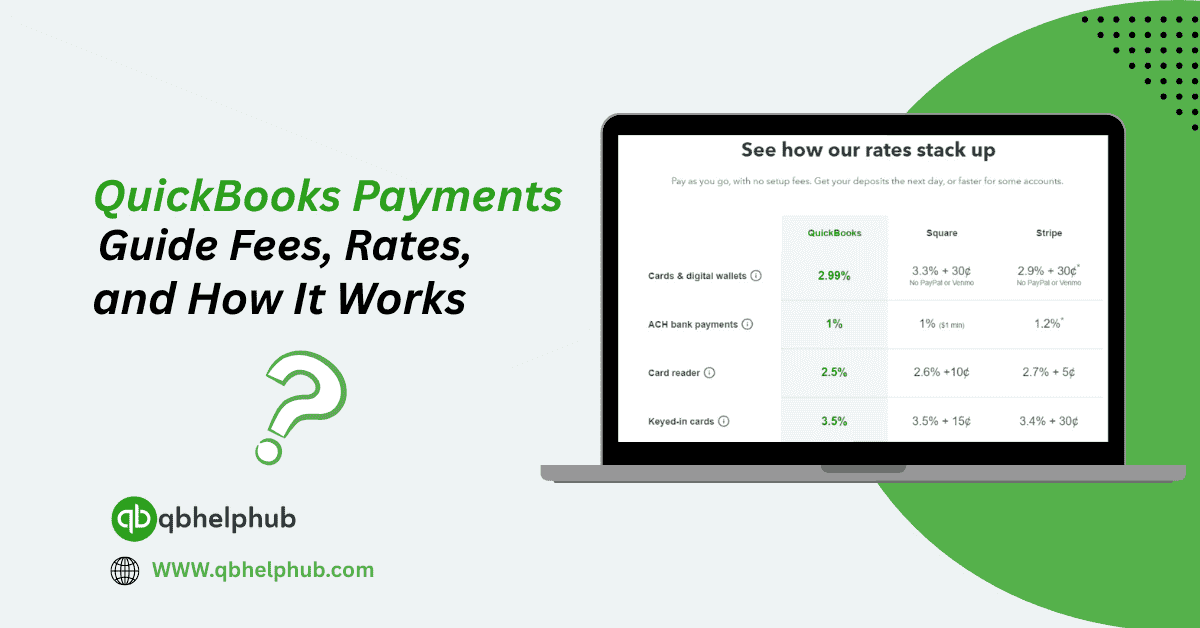
Here’s the part that usually gets people, fees. And while QuickBooks Payments is convenient, it’s not the cheapest option out there. Still, you’re paying for the simplicity and integration.
As of 2025, here are the standard fees:
- ACH bank transfer: 1% (capped at $10)
- Swiped cards (in-person or mobile): 2.4% + 25¢ per transaction
- Invoiced cards (online payments): 2.9% + 25¢ per transaction
- Keyed-in cards: 3.4% + 25¢ per transaction
There are no monthly fees or hidden costs, but these per-transaction fees can add up, especially if you process a lot of payments by card. Still, for many small businesses, it’s worth it for the convenience and automation.
Deposit Time: How Fast Do You Get Paid?
QuickBooks Payments offers next-day deposits for most credit card transactions and 1-2 business days for ACH payments. If you’re eligible, you might even get same-day deposits, which is a lifesaver during tight cash flow situations.
To check eligibility, QuickBooks will look at your payment history, industry type, and risk profile. Once enrolled, same-day deposits work automatically when customers pay by 3 PM PT.
Is It Safe to Use?
Yes, QuickBooks Payments uses industry-standard encryption and fraud protection. Payment information is securely processed, and you don’t need to worry about PCI compliance because Intuit handles that part for you.
So, whether you’re collecting a $50 payment or a $5,000 one, your data, and your customer’s data, stay safe.
Pros and Cons of QuickBooks Payments
Let’s break it down in real-world terms:
Pros:
- Fully integrated with QuickBooks
- Easy to set up and use
- Payments auto-recorded in your books
- Supports recurring billing and mobile payments
- No monthly subscription fees
Cons:
- Higher card transaction fees than some alternatives
- ACH payments still take 1-2 business days
- QuickBooks support can be slow at times
If integration and automation are what you’re after, the convenience outweighs the fees for most users. But if you’re just processing a few payments a month, you might want to look at low-fee alternatives.
Who Is It Best For?
QuickBooks Payments is ideal for:
- Freelancers or consultants who invoice clients often
- Small businesses offering services or digital products
- Anyone already using QuickBooks for accounting
If you’re trying to streamline your process and don’t want to mess with third-party payment systems, it fits like a glove.
Conclusion
QuickBooks Payments is designed to help small businesses get paid faster, more efficiently, and with fewer accounting headaches. While the fees might not be the lowest out there, the time saved on tracking payments, updating records, and following up on invoices can make a big difference. If you’re already using QuickBooks, it’s one of the easiest add-ons you can enable. Just be sure to weigh the transaction fees against the convenience, and keep an eye on how it fits with your overall payment volume and customer habits.
Read Also: How to Transfer QuickBooks to a New Computer: A Step-by-Step Guide
Get In Touch with Us
If you are interested to know more about QuickBooks and basic troubleshooting steps, we are here to help you through our dedicated customer service team. Fill out the customer response form or feel free to reach to us at support@qbsolved.com Our highly competent team is here to solve all your queries regarding QuickBooks.