The QuickBooks Online Certification Exam is a professional credential offered by Intuit for accountants, bookkeepers, and other financial professionals who want to demonstrate their expertise in using QuickBooks Online. Moreover, it’s a free, self-paced training and exam program designed to validate your knowledge of how QuickBooks Online works, from setup and navigation to advanced features like bank reconciliation, reporting, and payroll.
Read Also: Do You Need Web Migration to Transfer QuickBooks Desktop Pro 2021 to Online?
Why Take the QuickBooks Online Certification Exam?
Getting certified does more than boost your resume. Here’s why thousands of professionals take it:
- Credibility: Proves to clients and employers that you know QuickBooks inside and out
- Free Listing on Find-a-ProAdvisor: Once certified, you can be listed on Intuit’s Find-a-ProAdvisor directory
- Better Support Access: Certified ProAdvisors often get faster help and exclusive resources from Intuit
- Continuing Education Credits (CE/CPD): In some regions, it counts toward required learning hours
- Confidence and Efficiency: You’ll feel more confident using QuickBooks and help clients more efficiently
What’s Covered in the Exam?
The exam tests your understanding of QuickBooks Online Accountant (QBOA) and the features inside QuickBooks Online. Topics include:
- Navigating the QuickBooks Online interface
- Setting up new clients and managing the Chart of Accounts
- Handling bank feeds and reconciliations
- Recording transactions (sales, expenses, invoices, bills, etc.)
- Managing payroll and taxes (if applicable)
- Customizing reports and interpreting financial data
- Working with apps and third-party integrations
Read Also: How to Delete Multiple Transactions in QuickBooks Online?
What is the Structure of the Exam?
- Number of Questions: Typically, 55–80 multiple choice questions
- ⏱ Time Limit: Around 2–3 hours
- 📊 Passing Score: Usually 80%
- 🔄 Attempts: You get 3 attempts to pass; if you fail all three, you must wait 60 days to retake it
- 💻 Format: Online, open book (you can use QBO while taking it)
Where Do You Take It?
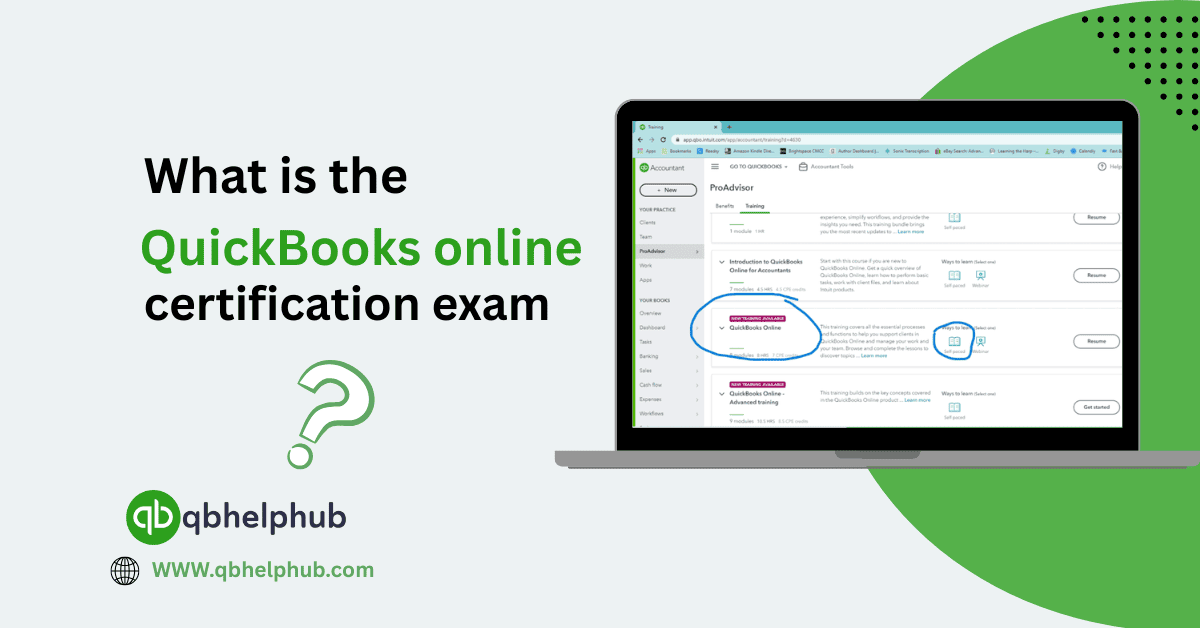
You must sign up for a QuickBooks Online Accountant account at quickbooks.intuit.com/accountants. From there:
- Firstly, go to the ProAdvisor tab.
- Click Training.
- Then, select QuickBooks Online Certification.
- Take the free training (optional but highly recommended).
- Start the exam when you’re ready.
Tips to Pass the Exam
- Take the free training first, it’s extremely thorough and covers all test material
- Have a QuickBooks Online demo account open while testing, so you can check live examples
- Use bookmarks and notes from the training modules
- Take breaks if needed. You don’t have to finish in one sitting
- Review flagged questions before submitting
Get In Touch with Us
If you are interested to know more about QuickBooks and basic troubleshooting steps, we are here to help you through our dedicated customer service team. Fill out the customer response form or feel free to reach to us at support@qbsolved.com Our highly competent team is here to solve all your queries regarding QuickBooks.
FAQs (Frequently Asked Questions)